
Hello, Ragnarok Online players.
This is the Ragnarok Zero Team from RO1 Studio.
As we welcome the Ragnarok Zero test, we have prepared a variety of features to help players enjoy their adventures even more,
and we are pleased to announce an improvement that allows Quest NPC locations to be shown through the
Navigation feature, making it easier to enjoy your adventures in Ragnarok Zero.
Here is how to check the location of Quest NPCs.
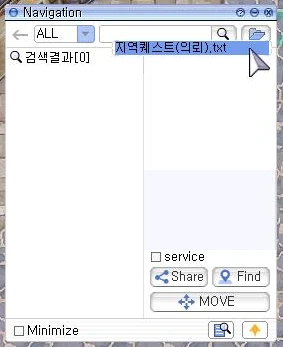
First, click the “Load External Route Info File” button located at the top right of the Navigation UI,
then select “Regional Quest (Request).txt”.
Navigation ALL Region Quest (Request).txt Search Results [0] □ service Share Find MOVE □ Minimize
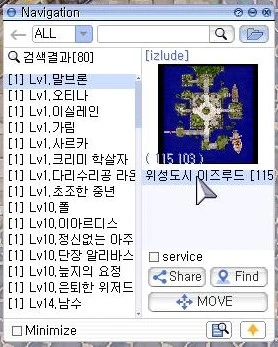
The Quest NPC locations will then appear in the list on the left side of the Navigation window.
The NPC list is sorted by the level requirement of the quest each NPC provides.
Navigation
ALL
Search results [80]
[izlude]
[1] Lv1. Altemon
[1] Lv1. Otina
[1] Lv1. Isilerplin
[1] Lv1. Garim
[1] Lv1. Shark
[1] Lv1.  Creamy Halshaza
[1] Lv1. Bridge Repairman Raon
[1] Lv1. Anxious Middle-aged Man
[1] Lv1. Paul
[1]
Creamy Halshaza
[1] Lv1. Bridge Repairman Raon
[1] Lv1. Anxious Middle-aged Man
[1] Lv1. Paul
[1]  Dummy 10. Iarindsa
[1] Dummy 10. Frazzled Aju
[1] Dummy 10. Captain Alizeta
[1] Dummy 10. Fairy of Neuji
[1] Dummy 10. Retired Wijeongd
[1] Lv14. Namsu
Dummy 10. Iarindsa
[1] Dummy 10. Frazzled Aju
[1] Dummy 10. Captain Alizeta
[1] Dummy 10. Fairy of Neuji
[1] Dummy 10. Retired Wijeongd
[1] Lv14. Namsu
Izlude [115 (115 103)
service Share Find MOVE Minimize

You can also check the Quest NPC's location on the World Map for quicker access.
Ragnarok : Zero
Midgard
Monster (Tab)
Orbis of Midgard
Abandoned Wolf Dungeon Geffen Dungeon Prรontera Labyrinth Izlude Dungeon Payon Dungeon Orc Dungeon Pyramid Dungeon Sphinx Dungeon Underground Waterway Dungeon Yomodo Dungeon Yomodo Dungeon Yomodo Dungeon Ant Hell Dungeon Shipwreck
You can directly create or edit the “External Route Info File” with the content you need.
The game will read a .txt file from the NavigationData subfolder inside your Ragnarok installation folder as the “External Route Info File”.
Within the “External Route Info File”, set one location per line.
Add settings in the following format.
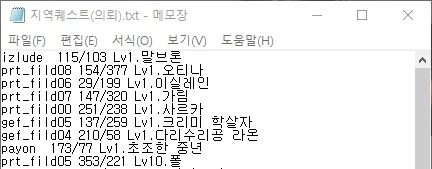
Map Name X-coordinate/Y-coordinate Display Name
Please refer to the added “Regional Quest (Request).txt” file.
지역퀘스트(의뢰).txt - Notepad File(F) Edit(E) Format(O) View(V) Help(H)
izlude 115/103 Lv1. Malbhon
prt_fild08 154/377 Lv1. Otina
prt_fild06 29/199 Lv1. Isilane
prt_fild07 147/320 Lv1. Gail
prt_fild00 251/238 Lv1. Sarka
gef_fild05 137/259 Lv1. Creamy Slaughterer
gef_fild04 210/58 Lv1. Bridge Repairman Raon
payon 173/77 Lv1. Anxious Middle-aged Man
prt_fild05 353/221 Dummy 10. Paul
We hope this helps make your adventures more enjoyable.