
In Ragnarok Online: Zero, you can trade items through shops,  vending stalls, and direct exchanges between players.
Shop Trading
You can trade consumable items, equipment, and other items through various NPCs located in each town. - Buying Shop Items When you click on a Merchant NPC, a message window will appear. Click the <Buy> button to display a list of items for sale. Click and drag the item you wish to purchase into the item window, then click the "Buy" button at the bottom to complete the purchase.
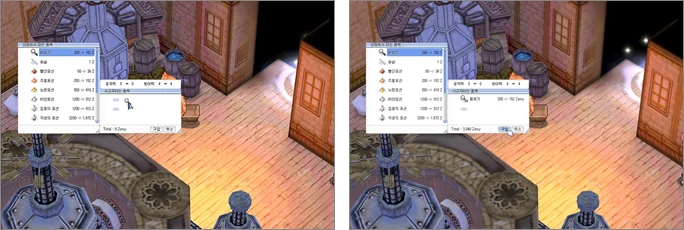
Digging Tool -1
Splint
Grazing Permit 50~150 Zeny
Smithy Nail 200~450 Zeny
 Fishing Rod 250~550 Zeny
Rusty Iron Sword 150~250 Zeny
 Hoe 500~1200 Zeny
Storage Key 1200~2200 Zeny
Scissorhands Glove 1200~2000 Zeny
Total : 0 Zeny
[Buy] [Cancel]
[Notice Window]
Close
Digging Tool -1
Splint
Grazing Permit 50~150 Zeny
Smithy Nail 200~450 Zeny
Fishing Rod 250~550 Zeny
Rusty Iron Sword 150~250 Zeny
Hoe 500~1200 Zeny
Storage Key 288 ~ 762 Zeny
Scissorhands Glove 1200~2000 Zeny
Total : 3,340 Zeny
[Buy] [Cancel]
For items that can be purchased in multiples at once, you can enter the desired quantity to buy as many as you need.
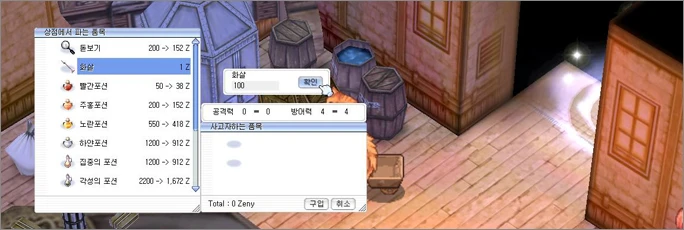
Items sold in the shop
 Magnifier 200 > 152 Z
Arrow 1 Z
 Red Potion 50 > 38 Z
 Orange Potion 200 > 152 Z
 Yellow Potion 550 > 418 Z
 White Potion 1200 > 912 Z
 Concentration Potion 1200 > 912 Z
 Awakening Potion 2200 > 1,672 Z
Total : 0 Zeny
Cancel Purchase
Arrow
100
Confirm
Attack Power 0 = 0 Defense 4 = 4
Items to purchase
- Selling Shop Items When you click on a shop NPC, a message window will appear. Click the <Sell> button to display a list of sellable items among those you possess. Move the item you wish to sell into the item window, then click the "Sell" button at the bottom to complete the sale.
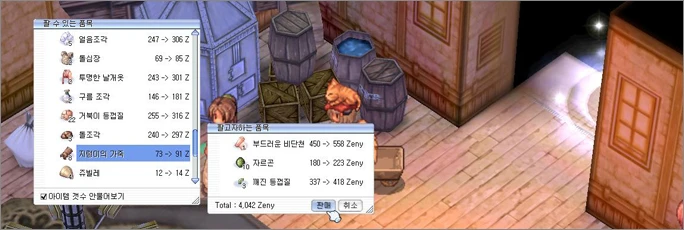
Sellable Items
 Ice Cubic 247 -> 306 Z
 Stone Heart 69 -> 85 Z
 Transparent Celestial Robe 243 -> 301 Z
 Cloud Crumb 146 -> 182 Z
 Turtle Shell 255 -> 316 Z
 Stone Fragment 240 -> 297 Z
 Earthworm Peeling 73 -> 91 Z
 Jewel Set 12 -> 14 Z
☑ Hide item quantity when selling
Items to sell
 Soft Silk 450 -> 558 Zeny
 Zargon 180 -> 223 Zeny
 Broken Shell 337 -> 418 Zeny
Total : 4,042 Zeny
Sell Cancel
※ When selling items, you can sell them for 50% of the purchase price, and through the Merchant-type character skills  Discount or
  Overcharge, you can gain up to a 24% benefit when buying and selling items.
Vending Trading
Using the Merchant-type character skill "Vending," you can buy and sell items at your desired price.
- Buying Items from a Vending Stall Click on the vending stall you wish to use to display a list of items for sale. Move the item you want to purchase into the item window, then click the Buy button to complete the purchase.
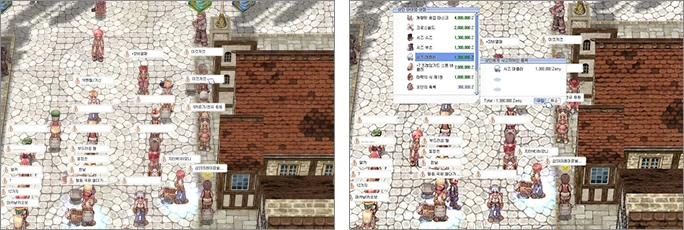
[Left image - NPC dialogue window and shop list]
1,300,000 Zeny
Total 1,300,000 Zeny
[Right image]
Enchant Slot Issuance and Registration
Rogue Inventory
Rogue Log
Rogue Log
Rogue Enchant  Guard Scroll Combination
Daein Weed Junk Item
(Rogue Inventory List)
1,300,000 Zeny
1,300,000 Zeny
1,000,000 Zeny
- Selling Items at a Vending Stall Vending stalls can be set up using a Merchant-type skill.
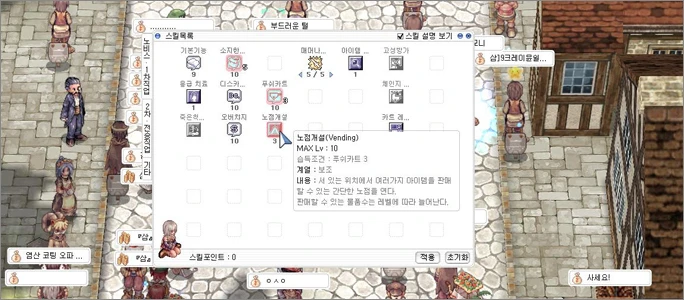
 Feather
Skill List
 Basic Skill | Items held... | Trading and... | Item... | Advanced Skill
[Icon]  First Aid - 1
[Icon] Dying... - 10
[Icon] Muinkoer... - 4/5/5
[Icon] Vending - 3
Dead[hidden]... | Overheat... | Vending
Vending
MAX Lv : 10
Requirement : Chowi Card 3
Type : Support
Description : Opens a simple stall at the current standing position to sell various items.
The number of items that can be sold increases with skill level.
Acid Coated O... | Skill Points : 0 | Apply | Reset
ㅇㅅㅇ
Buy now!
When using the skill, a list of items that can be sold at the vending stall and a vending setup window will appear, where you can enter the shop name and the sale price of the items.
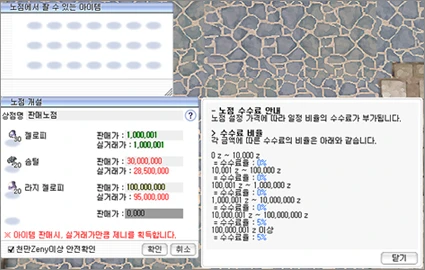
Items You Can Buy at Vending Stalls
Vending
Store Name: Sales Vendor
💰  Jellopy
Sale Price: 1,000,000
Actual Trade Price: 1,000,000
🔥 Shumrang
Sale Price: 30,000,000
Actual Trade Price: 28,500,000
🍷  Large Jellopy
Sale Price: 100,000,000
Actual Trade Price: 95,000,000
Sale Price: 0,000
※ When selling an item, you will receive Zeny equal to the actual trade price.
☑ Confirm safety for amounts of 10 million Zeny or more
[Confirm] [Cancel]
Vending Fee Information
A certain percentage fee is charged based on the price set at the vending stall.
- Fee Details
The fee rate based on the sale amount is as follows.
0 z ~ 10,000 z
= Fee Rate: 0%
10,001 z ~ 100,000 z
= Fee Rate: 1%
100,001 z ~ 1,000,000 z
= Fee Rate: 3%
1,000,001 z ~ 10,000,000 z
= Fee Rate: 4%
10,000,001 z ~ 100,000,000 z
= Fee Rate: 4.5%
100,000,001 z or more
= Fee Rate: 5%
[Close]
After entering all the information, click the confirm button to complete the setup of the vending stall, and a fee will be charged based on the sale price.
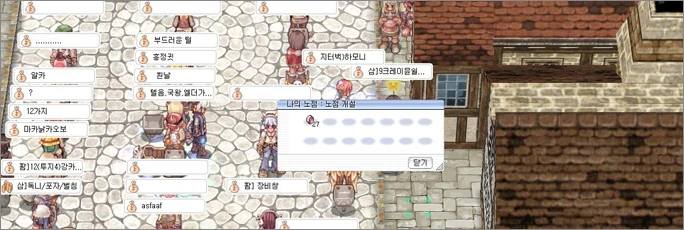
Alga
?
12 kinds
Makanyakaobo
Jjam1(Investment)4)Ganga
Sam)Fang/Spore/Balcheong
asfaaf
Feather (item)
Holcheonggwon
Pannael
Ddareum. Gukwang. Eldiga...
Ja[Teobeok]Harmony
Sam)3 Kraymon Way...
Ni's Attempt [Open Attempt]
[27]
[Close]
Jjam] Equipment Direction
Buy Market Trading
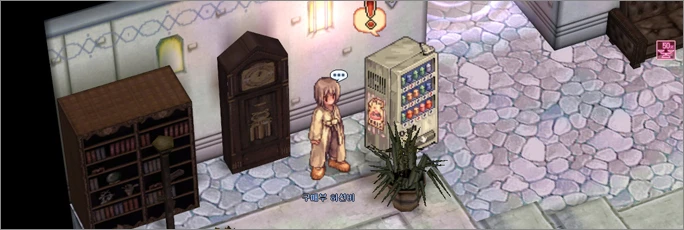
What shall I drink...
Through a Buy Market, you can purchase certain items in bulk. A Buy Market can be set up either by learning the skill from the "Purchasing Department Heo Seon-bi" NPC at the Alberta Merchant Guild, or by using an item sold by the "Black Merchant" NPC in the Morroc underground tavern. Users with Vending level 1 can learn the Buy Market setup skill for 10,000 Zeny, and using the setup skill requires the " Buy Market Permit" sold by Heo Seon-bi.
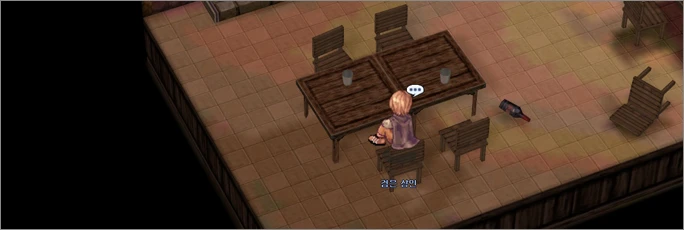
The Black Merchant
- Selling Items to a Buy Market Click on the Buy Market you wish to use to display a list of items that the stall is purchasing along with the items your character can sell. Drag the item you wish to sell from the sellable items into the item window, then click the Sell button at the bottom to complete the sale.
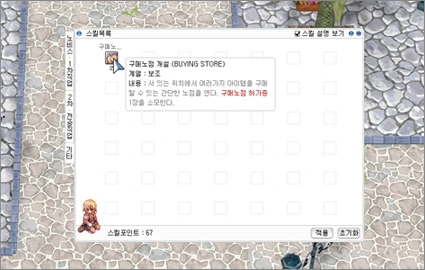
Skill List
View Skill Options
 Open Buying Store (BUYING STORE)
Type: Support
Description: Opens a simple vending store at your current location where you can purchase various items. Consumes 1 Buy Market Permit.
Skill Points: 67
Apply Reset
※ Some items in the game, such as equipment items, bound items, crafted items, and craftable consumable items, cannot be purchased.
Personal Trading
Direct exchange of items or Zeny between users can be conducted through trading.
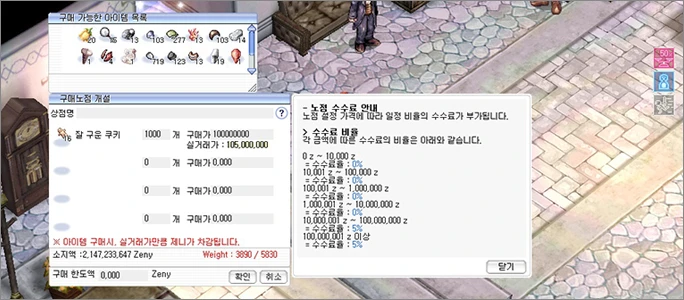
List of Purchasable Items
Open Buying Vending
Store Name
[Item Icon]  Well-baked Cookie 1000 Purchase Price 100000000
Actual Trade Price: 105,000z
0 items Purchase Price 0,000
0 items Purchase Price 0,000
0 items Purchase Price 0,000
※ When purchasing an item, the offered price is deducted by the amount of the actual trade price.
Held Amount: 2,147,233,647 Zeny Weight: 3990 / 5830
Purchase Limit: 0 Zeny
[Confirm] [Cancel]
- Vending Fee Information
A certain percentage fee is added based on the price set at the Vending stall.
Fee Rate
The fee rate for each slot is as follows.
0 z ~ 10,000 z
= Fee Rate: 0%
10,001 z ~ 100,000 z
= Fee Rate: 1%
100,001 z ~ 1,000,000 z
= Fee Rate: 3%
1,000,001 z ~ 10,000,000 z
= Fee Rate: 5%
10,000,001 z ~ 100,000,000 z
= Fee Rate: 7%
100,000,001 z or more
= Fee Rate: 10%
[Close]
Right-click on the character you wish to trade with and select 'Request Trade with 000' from the menu that appears. When the other party accepts the trade request, an exchange window will appear. Drag the items or Zeny you wish to trade into this window, and once both parties click the confirm button, the 'Trade' button will be activated.
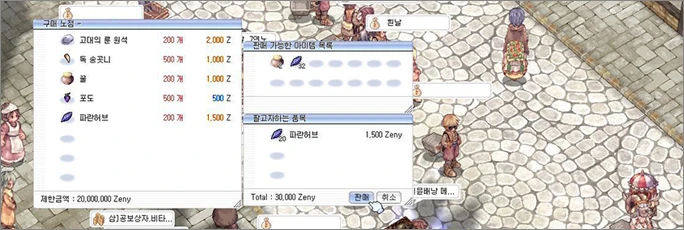
Buying Stall
Ancient Rune Fossil x200 2,000 Z
 Venom Canine x500 1,000 Z
Knife x200 1,000 Z
 Grape x500 500 Z
 Blue Herb x200 1,500 Z
Limit Amount: 20,000,000 Zeny
Received Sam-gong reward box...
Selling
Hwannal
List of Sellable Items
Items for Sale
Blue Herb 1,500 Zeny
Total : 30,000 Zeny
Sell Cancel
Moonbe-jjim jyeo...
You can check the detailed information of items registered in the exchange window by right-clicking on them, and clicking the activated Trade button will complete the personal trade.
※ Information on the website may change somewhat depending on game updates.